
A key notch is a mechanical feature used to distinguish or position a mating interface. On a gold finger PCB, its location must agree with the connector and with the contact numbering. A notch that appears centered in a picture can still be wrong for a particular connector option. Treat it as a controlled part of the interface, not a decorative cutout.
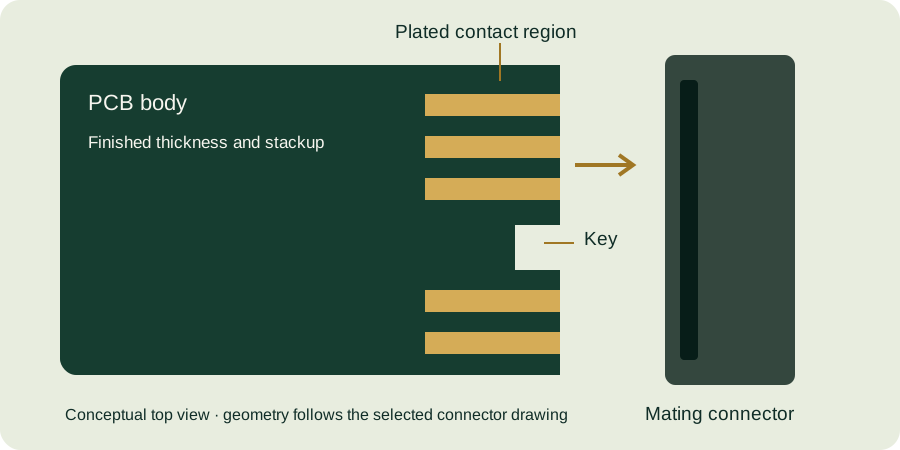
Record what the key is intended to prevent
Clarify whether the feature prevents reversed insertion, distinguishes interface variants or contributes to positional alignment. A feature should not be assumed to prevent every incompatible connection. Verify the possible orientations against the real connector and enclosure, including foreseeable assembly mistakes.
For product families with multiple board variants, maintain a compatibility table. Record the intended combinations and any combinations that must be mechanically excluded. Similar outline shapes or contact counts are insufficient evidence of electrical compatibility.
Control position, width and depth separately
| Feature property | Review question |
|---|---|
| Position | Which datum locates the notch relative to the contact array? |
| Width | What finished opening and tolerance apply? |
| Depth | Does the opening clear the relevant connector feature throughout insertion? |
| Corner geometry | Are permissible radii compatible with the mating part? |
| Nearby copper | What keepouts apply after profiling? |
Use the applicable connector drawing. Samtec’s HSEC1 document distinguishes card options with and without a slot. This illustrates why a notch copied from one position-count option should not automatically be retained for another.
Check clearance with explicit assumptions
Imagine a simplified rectangular key with maximum width 1.80 mm and a PCB notch with minimum width 2.00 mm. If they are perfectly centered, the total width difference is 0.20 mm, or 0.10 mm nominal clearance on each side at those size extremes. This calculation alone does not account for positional error, corner shape, insertion angle or deformation.
If their relative center position can shift by 0.08 mm, one side would have only 0.02 mm clearance in that simplified model. The example demonstrates the importance of position; it does not recommend that clearance for a real design. Build the complete tolerance model and review it with the relevant mechanical owners.
Do not repair a mismatch informally
Manually enlarging a notch on a prototype can answer a limited investigative question, but the modified board no longer represents the released geometry. Label it as modified and record the change. Do not use a successful fit after hand modification as evidence that the original production drawing is correct.
If a key change is approved, update the outline, contact numbering views, fabrication drawing and compatibility record together. Check whether the revised machining boundary affects nearby copper or the beveled edge.
Key-feature checklist
- Identify the exact connector and card option.
- State the intended polarization or compatibility function.
- Dimension notch position, size and corner geometry.
- Include positional effects in the clearance review.
- Verify numbering and copper keepouts around the notch.
- Record every approved modification in the release files.
Use the interface design guide and dimensional inspection overview. Submit the key detail for a manufacturing review with the connector reference and outline file.
Continue with our gold finger PCB design guide and engineering tools.